Tuesday, June 26, 2012

Intel Showcases new Technology at the Retail and Innovation tour Read more: Intel Showcases new Technology at the Retail and Innovation tour


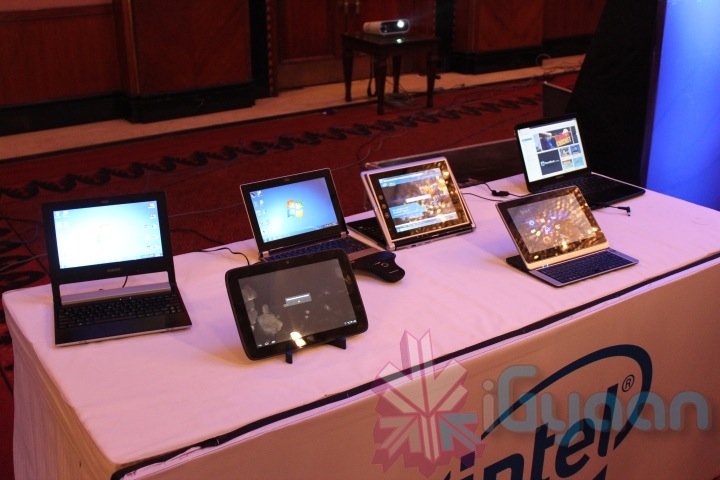
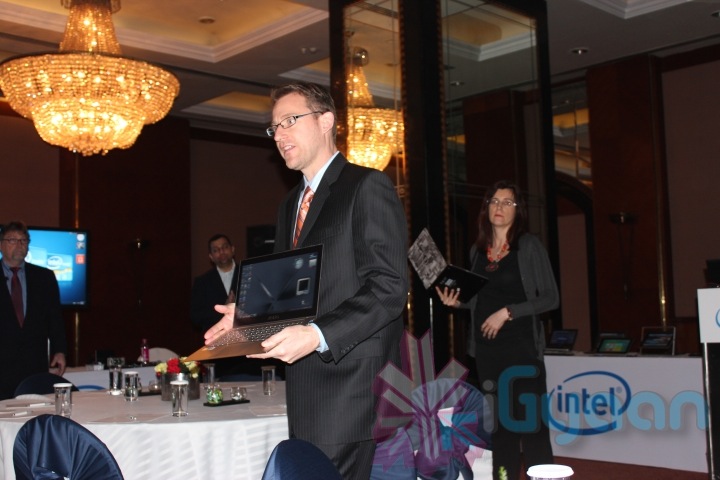
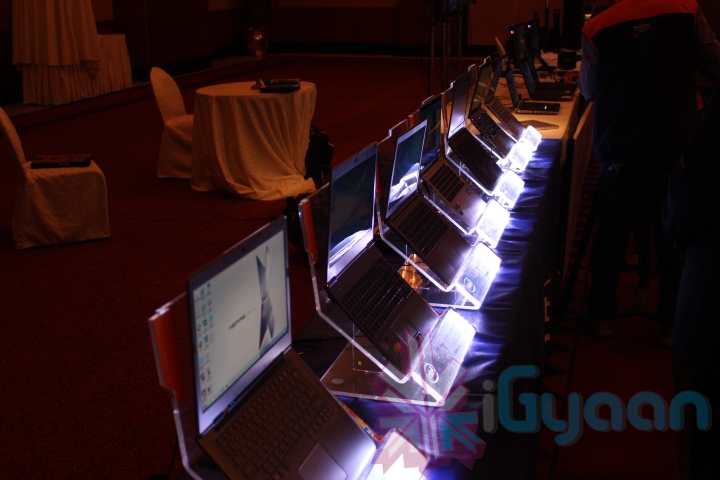
Intel on Monday introduced their new technology and features in New Delhi, India. Talking majorly on the new trend of ultrabooks, Intel showcased some reference designs and some already existing retails products. 
intel 2012 tour 8 560x373 Intel Showcases new Technology at the Retail and Innovation tour in New Delhi
The company also showed off its lineup of Tablets and All in One PC’s with touch screens. The new line also includes some interesting technological improvements including smart cache and better battery life performance. 
intel 2012 tour 47 560x373 Intel Showcases new Technology at the Retail and Innovation tour in New Delhi
The highlight of the event was Intel’s new smart security technology, which like Apple iCloud, lets you monitor and secure your laptop if lost or stolen. This new layer of security is added at the base level firmware below the Bios of the manufactured machine. Which will not change even if the laptop is re-flashed with a new operating system.
intel 2012 tour 16 560x373 Intel Showcases new Technology at the Retail and Innovation tour in New Delhi
Intel also showcased the unique identifier for online security that is now inbuilt into their chipsets. Just like the One Time Password Generator handed out by banks to secure login credentials of your bank accounts, this technology can now be directly used via your personal laptop hence eliminating the need for a one time password device.

New breakthrough in solar technology


New breakthrough in solar technology
Solar technology via Shutterstock
A new prototype solar cell has been designed by researchers at the University of Florida. They claim that it sees new levels of efficiency and could be made using a roll-to-roll process, a spokesman said, "Imagine making solar panels by a process that looks like printing newspaper roll to roll," said Franky So, a UF professor in the department of materials science and engineering.
This process of manufacture has been something of interest for many years but the biggest problem has always been that they simply cannot harness enough energy per square inch from this process to make it a viable option.
Solar Cell panel
Solar Cell panel via Shutterstock
However, this has now changed with the team at the University of Florida achieving 8% efficiency in their new prototype solar cells. They have achieved this by using a zinc oxide polymer blend as the electron charge transporting material.
They say it is the process of applying the zinc that is the secret behind their new success. The chemistry team, run by John Reynolds, has added an extra polymer coating that overlays the zinc oxide polymer blend and Reynolds claims that this is what has seen the increase in efficiency, "That's where the real action is," he said. The polymer blend creates the charges, and the zinc oxide layer delivers electrons to the outer circuit more efficiently."
This new creation will now be transported to Riso National Laboratory over in Denmark. There, they will be able to copy the materials and manufacturing processes to give them more thorough testing. It is a collaboration that could see a new era of solar power, "This sort of thing can only happen when you have interdisciplinary groups like ours working together," said Reynolds.

Apple iWatch


Apple has been innovatively making gadgets which are being used, recommended & adored worldwide as they are known for their quality and performance. Very talented italian designers and creative concept makers from ADR Studios, came across with another great concept of the iWatch, and I swear I would love to use this gadget.
Apple iWatch 2 Concept is an innovative design from ADR Studio, and recently it has created a new excitement in the market. Keep in mind that the iWatch 2 is only in the concept phase, and there’s no word on if it will ever materialize. But we would love to see someone take this idea and turn it into a real product.
iWatch2 Concept Features:
  • 32GB memory
  • Frontal face camera
  • WiFi and Bluetooth
  • PK2 Kevlar insert
  • Weather forecast system
  • LCD projector to show everywhere pictures by your iPhone / iPad and more…
Apple iWatch 2: The Most Beautiful Photo Gallery
iWatch 2 Concept New Technology
New iWatch 2 Picture
Cool Apple iWatch 2
Beautiful Apple iWatch 2 Picture
Awesome iWatch 2 Back and Front Face Photo
Apple iWatch 2 Concept of 2012
Apple iWatch 2 Concept by ADR Studio
2012 iWatch 2 Latest Concept

LG Introduces New Switching Technology


Better options and features can really help companies to attract more consumers and therefore top companies like LG and Samsungand many others are struggling to come up with better features that can impress the customers all over the world. LG has recently made an announcement that they have been able to come up with a new technology that allows consumers to switch between voice and video modes even while they are on the call. LG made this announcement while they were demonstrations at the Mobile World Congress 2012 happening in Barcelona, Spain.
New Switching Technology at MWC 2012
The company further revealed that the new technology that they have makes use of the high resolution and high quality voice calls that is available on LTE networks. This is why the user can always switch back and forth to voice and video mode even while the call is active. Sharing more information about the new impressive technology LG said that the Conversational Video Service is an extension of Voice Over LTE technology which makes it easier for them to allow consumers to decide how they want to take their calls. LG also announced that so far they do not have a smartphone that can handle this technology but they will bring out their new smartphones by the fourth quarter of 2012.

Apple iWatch 2 Concept Pictures of 2012


Apple has been innovatively making gadgets which are being used, recommended & adored worldwide as they are known for their quality and performance. Very talented italian designers and creative concept makers from ADR Studios, came across with another great concept of the iWatch, and I swear I would love to use this gadget.
Apple iWatch 2 Concept is an innovative design from ADR Studio, and recently it has created a new excitement in the market. Keep in mind that the iWatch 2 is only in the concept phase, and there’s no word on if it will ever materialize. But we would love to see someone take this idea and turn it into a real product.
iWatch2 Concept Features:
  • 32GB memory
  • Frontal face camera
  • WiFi and Bluetooth
  • PK2 Kevlar insert
  • Weather forecast system
  • LCD projector to show everywhere pictures by your iPhone / iPad and more…
Apple iWatch 2: The Most Beautiful Photo Gallery
iWatch 2 Concept New Technology
New iWatch 2 Picture
Cool Apple iWatch 2
Beautiful Apple iWatch 2 Picture
Awesome iWatch 2 Back and Front Face Photo
Apple iWatch 2 Concept of 2012
Apple iWatch 2 Concept by ADR Studio
2012 iWatch 2 Latest Concept

Saturday, May 26, 2012

App highlights

Like on the iPad (and iPhone for that matter) app store, each app page is a standardized, simple affair with a brief description, some screenshots, and customer ratings. Since the store just launched this morning, there aren't a ton of customer reviews just yet, but we expect that'll change in due time (read: quickly).


When you actually buy an app, the symbol kind of advances down into your connect, where it begins installing with a little position bar below. This movement seems very iOS-esque (iOSque?), and could certainly be an indicator of elements to come when Lion comes in Summer time '11. You can also monitor obtain position under the Buys tab, where you can see how huge the app is as well. Programs are downloadable to your Mac's Programs directory, and it doesn't look like there's any way to modify that standard (for now at least).

As far as installing apps, that's very much all there is to it. It's obvious that this procedure is used to be as easy and structured as possible just like the iOS alternatives. We'll be upgrading this publish with more apps as we examine 'em out, but if you've got any you would -- or wouldn't -- suggest don't think twice to audio off in content.

App highlights


Upset Wildlife ($4.99 starting price): It's the same Upset Wildlife you know and lose a lot of time of efficiency because of. The multi contact track pad is a amazingly good operator, but it still doesn't go with immediate feedback like on your iPhone or iPad. Also, the app uses a mouse-like feedback for choosing alternatives and then changes back to immediate contact control for real game play, so changing between those ways can take a little getting used to.


Tweets (Free): If you're at all acquainted with Tweetie for Mac, you'll experience right at house with Tweets for Mac, an app we actually realized would end up releasing on the Mac App Shop. It's got assistance for local retweeting, several records, and Roar announcements, so if you've been out there for a new Tweets customer and #newtwitter just isn't reducing it, be sure to provide this a obtain.

Soundcloud (Free): Soundcloud's app in the Mac App Shop requires everything we dislike about the Soundcloud app and repairs it. We're discussing simpler selecting looking, as well as built-in sound catch so you can publish immediately from within the app. Adhere to and preferred from right within the app to curate a playlist of your preference -- all for the very low cost of "free".

Chopper 2 (99 cents for a limited time): A followup to the incredibly well-known Helicopter activity for iPhone and Mac, Helicopter 2 is a fun activity with some very lovely 3D design. This second version has 36 new tasks, and you can even use your iPhone or iPod contact as a WiFi handheld distant management. For 99 dollars -- for now at least -- how incorrect can you go?

Mac OS X Lion hands-on preview


The apple company declared Mac OS X Lion with significant excitement at its Returning to the Mac occurrence last Oct, and now it's decreased the first designer review on the community -- providing us a opportunity to taste some of the big pet's new functions and UI principles. We set up the dev develop on one of our MacBook Professionals and used it over the few days, and while we won't be able to see any large changes in day-to-day work-flows until our preferred applications are modified to take benefits of Lion, we did see a lot of exciting system-level functions and extras -- and yes, iOS's effect is all over the position. Study on for a complete malfunction of what's new!


Launchpad


Apple's making a big cope out of Launchpad, Lion's new iOS-style app launcher, but we're supposing most energy customers will adhere to the Person, Connect, and Concentrate for immediate entry to frequently-used applications. We're wondering less-advanced customers will really like it, though -- it imitates the effective iOS app user interface to a tee, such as directory assistance and immediate app sets up from the Mac App Shop.

Full-screen apps

Another function that seems meant to be ignored by energy customers and dearest by the public, Apple's forcing difficult for designers to develop full-screen app opinions for Lion. It's an concept to suit some applications much better than others -- iPhoto and Opera work well in full-screen function, but starting iCal fullscreen on our 27-inch iMac was efficiently absurd. Changing an app to complete display reveals it in a devoted area by standard, so you can easily change between the pc and start full-screen applications with a three-finger run -- a shift that imitates the multi-tasking actions Apple's been examining in iPad iOS designer creates.

Mission Control

While Launchpad and the concentrate on full-screen applications experience targeted at the informal individual, Objective Control seems like the actual reverse -- a function only a energy individual could really like. It's generally a specific management UI for Present and Areas that comes up with a three-finger run up, and while it performs well for what it is, it doesn't really decrease any complexness -- it just creates it all simpler to see at once. That's useful enough, we assume, but the Connect, command-tab app switching, and the multi-tasking actions all experience more effective than losing into Objective Control thus far.


AirDrop

One of Lion's niftiest new functions is AirDrop, which allows fast and simple computer file transactions between WiFi-equipped Apples. Starting the AirDrop section in the Person creates your device discoverable to other devices with AirDrop start, and changing information is as simple as pulling and verifying. Although it uses WiFi, you don't need a wireless router to use it -- the WiFi snacks in most modern Apples are able to quickly change back and forth between AirDrop and a conventional program relationship. The apple company hasn't said what the earliest device with AirDrop assistance is, but we get the sensation even devices that are several decades of age will be able to use the function.

Resume

Another collection from iOS, applications are now able to preserve condition on quit and choose up right where they remaining off. This connections in with the new multi-tasking control -- even if the program leaves an app to totally restore sources, continue indicates it'll look like nothing ever occurred when you start it again. Obviously this technique has been used to great impact in iOS and Operating program (and gradually in Ms windows Cellphone 7), but we'll see how it performs out on the pc, where applications use greatly more storage space and storage space.

App updates

Apple's remodeled a variety of of built-in applications in Lion, and the iOS impact is easily obvious -- run some of these applications full-screen on an 11-inch MacBook Air and you'd be hard-pressed to tell the change from an iPad. Some highlights: